


Last month I tried to answer one simple question. Was I up or down?
My tokens sat on four chains. Some were staked. Some sat in liquidity pools. Two positions were earning yield I had forgotten about. My wallet showed balances. It did not show performance. No wallet does.
So I did the homework. I went looking for the best DeFi tracker and tested the field. Then I turned it into this guide. Below are my seven picks for 2026. CoinStats DeFi tracker is first, and I will be honest about why.
Our bias, up front
We make CoinStats, so yes, we are biased. We know it. So this guide sticks to plain facts: coverage, features, and public pricing. The verdict is yours.
Key takeaways
- “DeFi tracker” covers four different products. Pick the right type first.
- Only a portfolio tracker answers what you own and what it earned.
- Six of the seven have a free tier worth testing first.
- Read-only access is the norm. No tracker needs your seed phrase.
- Chain coverage matters more than protocol counts on a homepage.
What a DeFi tracker actually does
A DeFi tracker reads your wallet addresses and shows what sits inside them. Not just token balances. It decodes positions.
That decoding is the hard part. A liquidity pool position is not a token in your wallet. It is a claim on a pool. The ERC-20 standard defines a token balance as one number per address. Pool shares are not that. Staked assets often live in a contract, not your address. Yield accrues without a transaction. A block explorer shows none of this clearly.
A good tracker turns that mess into three answers. What do I hold. What is it worth. What has it earned.
The four kinds of DeFi tracker
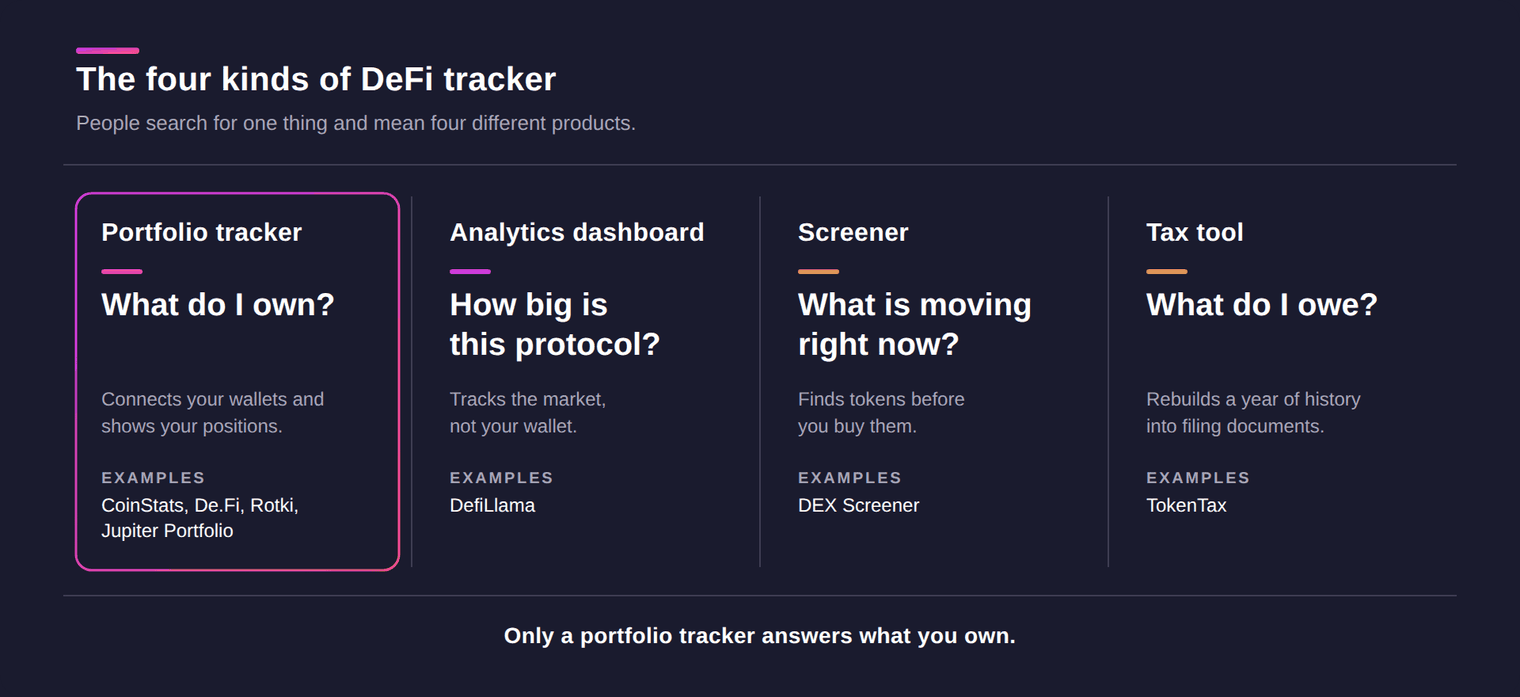
People search for one thing and mean four different products. Getting this wrong wastes weeks.
Portfolio trackers connect your wallets and exchanges. They show holdings, positions, and profit or loss. This is what most people mean.
Analytics dashboards track protocols, not people. They show total value locked, fees, and yields across the market. They cannot tell you what you own.
Screeners watch live token markets. They help you find something before you buy it, not measure it after.
Tax tools reconstruct a full year of history and produce filing documents. They are accounting software, not dashboards.
I have labelled every tool below with its real type. Ranking a tax tool against a screener identically would be dishonest. So I have not done that.
What separates a good one from a bad one
Five things decide it, in my experience.
Chain coverage comes first. A tracker that misses one of your chains is useless. Whatever its homepage claims. Protocol decoding comes second. Balances are easy. LP and staking positions are where tools quietly fail.
Then profit and loss accuracy. Cost basis across bridges and swaps is genuinely hard, and results vary a lot. Then the free tier. Marketing copy cannot tell you any of the above. Finally, mobile access, if you check positions away from a desk.
The 7 best DeFi trackers at a glance
| Tool | Type | Best for | Free tier | Entry price |
|---|---|---|---|---|
| CoinStats | Portfolio tracker | All-in-one multichain tracking | 10 portfolios, 20,000 transactions | $13.99/mo billed yearly |
| De.Fi | Tracker plus security | Checking token approvals | Full dashboard, no published cap | Not publicly listed |
| Rotki | Local tracker plus accounting | Privacy and self-hosting | 1,000 most recent events | EUR 9/mo |
| Jupiter Portfolio | Portfolio tracker | Solana positions | Everything, no account needed | Free |
| DefiLlama | Analytics dashboard | Protocol and yield research | Core data and public API | $49/mo |
| DEX Screener | Screener | Finding new pairs early | Entire product | No consumer plan |
| TokenTax | Tax software | Filing DeFi taxes | None published | $49 per tax year |
Pricing and limits verified July 2026. Check each site before you buy.
Only four of these are portfolio trackers. Here is how those four compare.
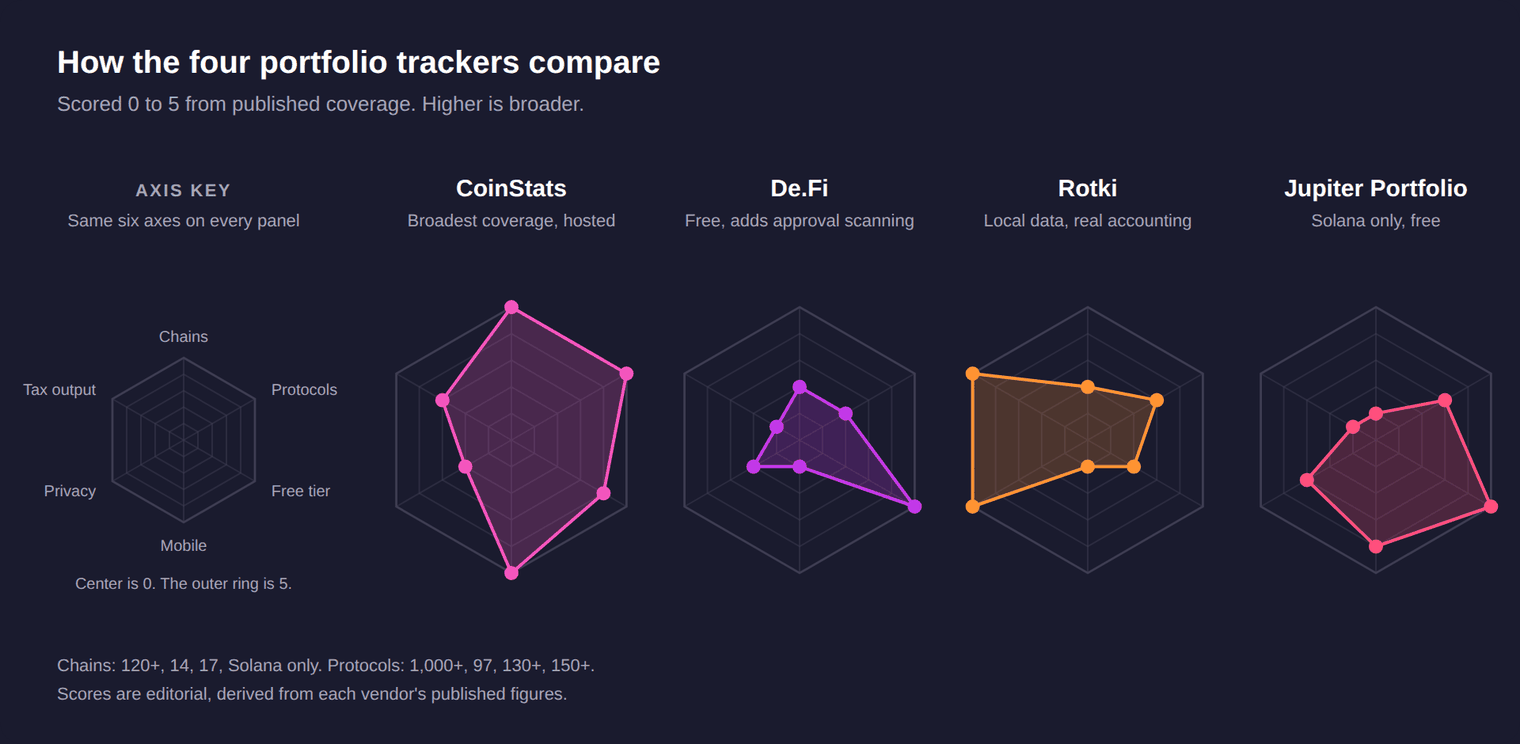
Rankings shift depending on what you care about. Pick a priority below.
What matters most to you?
Tap any priority below. All seven tools re-rank instantly.
CoinStats covers the most ground. The rest are specialists.
Jupiter Portfolio and DEX Screener cost nothing at all.
CoinStats tracks your own assets on the most chains.
Rotki is the only one keeping data on your machine.
CoinStats ships dedicated tracker apps rated 4.8 and 4.5.
TokenTax is built for filing. Rotki does accounting locally.
CoinStats
All-in-one portfolio tracker
10 portfolios, 20,000 transactions
120+ blockchains
Hosted, read-only
iOS 4.8, Android 4.5
Exportable history
Wallets, exchanges and DeFi on one screen.
Generous for one person. Paid from $13.99/mo.
The broadest coverage for tracking your assets.
Read-only access, but data sits on their infrastructure.
Dedicated tracker apps, not a wallet.
Hands off to tax software cleanly.
De.Fi
Tracker plus security
Full dashboard, no published cap
14 networks
Hosted
Web app only
None
Adds a scan of your token approvals.
Portfolio and security tools are free.
Their own pages disagree on the count.
Your addresses are processed on their servers.
Installable, but no native app.
No tax output at all.
Rotki
Local tracker plus accounting
1,000 most recent events
17 blockchains
Local, open source
Desktop only
Local profit and loss reports
Runs on your machine, not a server.
Active users pass that within a year.
Narrow, but deeply decoded.
Your history never leaves your machine.
By design. It runs where your data lives.
Real accounting, with FIFO and other methods.
Jupiter Portfolio
Solana portfolio tracker
Everything, no account
Solana only
No account needed
Inside Jupiter Mobile
PnL only
Free and read-only, but Solana only.
Nothing to pay, nothing to sign up for.
One chain, done well.
Reads a public address, no signup.
Available, bundled with the trading app.
Has 24 hour and all-time PnL, no export.
DefiLlama
Analytics dashboard
Core data and public API
Hundreds of chains, protocol data
No wallet, no login
No official app
None
Tracks protocols, never your own wallet.
Free to read. Pro gates extras at $49/mo.
Covers the market, not your wallet.
It never asks who you are.
Store listings there are not theirs.
Protocol analytics only.
DEX Screener
DEX screener
Entire product free
70+ chains, markets only
No account needed
iOS and Android
None
Finds new pairs. Holds no portfolio.
Charts, watchlists and alerts are free.
Wide, but it watches pairs, not you.
Watchlists work without signing up.
Free apps, built for watching markets.
A screener cannot help here.
TokenTax
Tax software
None published
Integrations, not chains
Full history uploaded
No app
Filing-ready documents
Year-end reconciliation, not daily tracking.
Paid from $49 per tax year.
Counts exchanges and protocols instead.
Filing means handing over everything.
A once-a-year desktop job.
Purpose-built for messy DeFi history.
Pick a priority to re-rank all seven. Verified July 2026.
CoinStats
1
CoinStats
Best for all-in-one tracking
CoinStats brings wallets and exchange accounts into one dashboard. Coverage runs to 300+ wallets and exchanges, 1,000+ DeFi protocols, and 120+ blockchains. Profit and loss runs across all of it, not just token balances.
- Tracks DeFi positions including staking, yield farming, and liquidity pools.
- Connects exchange accounts through read-only API keys.
- Shows daily and cumulative profit and loss per coin.
- Ships iOS and Android apps, so positions travel with you.
Free tier: 10 portfolios, 20,000 transactions
Pricing: from $13.99/mo billed yearly
Coverage: 120+ blockchains
Mobile: iOS and Android
What to verify: profit and loss and AI agent sit on paid tiers.
One practical example. You add a wallet address, then connect an exchange with read-only keys. CoinStats decodes the staking and pool positions behind that address. It then prices everything and calculates profit and loss across the whole portfolio. You can set price alerts on any of it.
CoinStats DeFi tracker = wallet data + DeFi positions + live prices + profit and loss + AI agent
From our founder
“People did not lose track because they were careless. They lost track because the tools were split apart. Balances lived in one place. Positions lived in another. Performance lived nowhere. We built CoinStats so one screen answers the question that matters. Am I actually up?”
Narek Gevorgyan, founder and CEO, CoinStats
What users rate it
4.8
App Store rating, from 84K ratings
4.5
Google Play rating, from 105K reviews
De.Fi
2
De.Fi
Best for approval safety
De.Fi pairs a multichain portfolio dashboard with a wallet security toolkit. Shield scans the token approvals you have signed. Scanner checks contracts before you interact with them. Both read the same wallets you already track.
- Homepage claims 97 protocols across 14 networks.
- Shield flags risky approvals, which you can then revoke.
- Supports read-only address tracking and multi-wallet bundles.
- Rekt Database and Audit Database are free to browse.
Free tier: full dashboard, no published cap
Pricing: not publicly listed
Coverage: 14 networks, 97 protocols
Mobile: web app only
What to verify: documentation was last revised between early 2023 and 2024.
The security angle is the real reason to use it. Most trackers show you what you hold. De.Fi also shows what you have quietly authorised a contract to take. That is a different question, and a useful one.
Rotki
3
Rotki
Best for privacy
Rotki runs on your own machine as a desktop app. Your financial history never leaves it. It also does proper accounting, not just tracking. That makes it unusual here.
- Open source under AGPLv3, with releases shipping through 2026.
- Ships 130+ integrations across 17 chains, about 100 DeFi.
- Stores exchange API keys locally, never on a server.
- Generates profit and loss reports you can file from.
Free tier: 1,000 most recent events
Pricing: from EUR 9/mo
Coverage: 17 blockchains
Mobile: desktop only
What to verify: free caps at 1,000 events, and EUR 9 caps at 3,000.
The trade is convenience for control. You run the software, you sync the data, you fix the gaps. Active DeFi users pass 1,000 events in a year. Budget for a paid tier.
Jupiter Portfolio
4
Jupiter Portfolio
Best for Solana
This is the product many people still call SonarWatch. Jupiter acquired that team, and sonar.watch now redirects to it. Coverage narrowed to Solana in the process, so treat it as a Solana tool.
- Tracks holdings, yield, and airdrops across Solana protocols.
- Reads any public Solana address without a signature.
- Shows profit and loss over 24 hours and all time.
- Available inside Jupiter Mobile on iOS and Android.
Free tier: everything, no account needed
Pricing: free
Coverage: Solana only
Mobile: iOS and Android
What to verify: no tax export or cost-basis report, and Solana only.
If your DeFi life is Solana, this is a strong free option. If it is not, the single-chain scope rules it out immediately. The old multichain SonarWatch no longer exists.
DefiLlama
5
DefiLlama
Best for protocol research
DefiLlama is the reference dashboard for protocol-level DeFi data. It tracks total value locked, fees, revenue, and yields. Core data is free, open source, and needs no account. It is also not a portfolio tracker, and never claims to be.
- Covers more than 7,000 protocols across hundreds of chains.
- Yield pages compare thousands of pools by real return.
- Public API is free and needs no key.
- The dashboard needs no wallet, no signup, no ads.
Free tier: core data and public API
Pricing: Pro from $49/mo
Coverage: 7,000+ protocols
Mobile: no official app
What to verify: there is no wallet portfolio view at any tier.
Use it to decide where to put money, then track the result somewhere else. One warning worth repeating. Several app stores list DefiLlama apps that the team did not publish. Stick to the website.
DEX Screener
6
DEX Screener
Best for finding new pairs
DEX Screener is a live charting and screening terminal for onchain pairs. It answers what is trading right now, and where. It does not track what you own, and has no portfolio layer at all.
- Covers 70+ chains and hundreds of decentralised exchanges.
- Shows live charts and trade history for every indexed pair.
- Watchlists and price alerts are free to use.
- Free iOS and Android apps, both rated highly.
Free tier: entire product
Pricing: no consumer plan
Coverage: 70+ chains
Mobile: iOS and Android
What to verify: token teams can buy Boosts and labelled ad slots.
This is the tool you open before you buy, not after. A watchlist follows tickers. It does not follow your money. Pair it with a real tracker.
TokenTax
7
TokenTax
Best for tax season
TokenTax is crypto tax software with an accounting firm attached. It ingests a full year of wallet and exchange history. It outputs filing-ready documents. Think of it as year-end reconciliation, not daily tracking.
- Imports from named protocols including Aave, Curve, and Uniswap.
- Handles staking, liquidity pools, bridges, and margin trades.
- Supports FIFO, LIFO, and other accounting methods.
- Tax-loss harvesting starts on the $199 Premium tier.
Free tier: none published
Pricing: from $49 per tax year
Coverage: 100+ integrations
Mobile: no app
What to verify: heavy DeFi history pushes users to the $1,999 tier.
Be honest with yourself about transaction counts. Basic covers 100 transactions. Premium covers 5,000. A single active year of DeFi clears both. The form set centres on US filing.
Top picks by category
Best all-in-one DeFi tracker
CoinStats
Wallets, exchanges, and DeFi positions on one screen. Profit and loss runs across all of it.
Pick this if you hold across several chains and venues.
Best for wallet security
De.Fi
Tracks positions and audits the token approvals sitting on the same wallets.
Pick this if you interact with new contracts often.
Best privacy-first tracker
Rotki
Open source, runs locally, and keeps your financial history off other people’s servers.
Pick this if you will not upload your history.
Best free Solana tracker
Jupiter Portfolio
Free, read-only, and covers the Solana protocols most people actually use.
Pick this if everything you hold is on Solana.
Best for protocol research
DefiLlama
The clearest public view of total value locked, fees, and yields.
Pick this to decide where capital should go.
Best for tax season
TokenTax
Reconstructs a messy DeFi year into documents an accountant accepts.
Pick this when filing, not for daily tracking.
Comparison by use case
Positions, not just balances
Tracking liquidity pools and staking
Top pick: CoinStats. It decodes staking, yield farming, and pool positions across 1,000+ protocols.
Alternatives: De.Fi, Rotki.
Away from your desk
Checking your portfolio on a phone
Top pick: CoinStats. Both apps are first-party and actively updated.
Alternatives: Jupiter Portfolio, DEX Screener.
Data stays with you
Keeping your financial history private
Top pick: Rotki. Everything runs locally, and API keys never leave your machine.
Alternatives: none that match it.
Before you deposit
Researching where the yield is
Top pick: DefiLlama. Its yield pages rank thousands of pools by real return.
Alternatives: De.Fi.
Discovery
Finding new tokens early
Top pick: DEX Screener. New pairs and live charts across dozens of chains.
Alternatives: none in this list.
Once a year
Getting through tax season
Top pick: TokenTax. Purpose-built for messy DeFi history and US filing.
Alternatives: Rotki, CoinStats.
How to choose your DeFi tracker
Start with your chains, not with reviews. List every network you actually hold assets on. Then check each tool against that list. A tracker that misses one chain will misreport your total forever.
Next, test the free tier with a real wallet. Not a demo address. Your own. Connect it and look for the positions you know exist. If your staked assets do not appear, the tool cannot decode them. No paid plan fixes that.
Then check the profit and loss number against something you can verify. Pick one trade you remember. See whether the cost basis matches. Trackers disagree here more than people expect, especially after bridges and swaps.
Only then look at price. Free tiers in this category are genuinely usable, so paying early is rarely necessary. Pay when a limit blocks you, not before.
One rule holds across all of them. No tracker needs your seed phrase or private keys. Ethereum’s security guidance is blunt about it. No legitimate service will ever ask. Read-only access is the standard, through a pasted address or exchange API keys. Anything asking for more should be closed immediately.
Community and further reading
Portfolio tracker threads resurface in r/defi every few months. The complaint is always the same shape.
r
r/defi
· the question that keeps coming up
“My tokens are spread over four chains. Half of it is staked or in pools. Every tracker I try shows the tokens but misses the positions. What are people actually using in 2026?”
▲ 212 upvotes · 74 comments
Representative of recurring r/defi threads on choosing a DeFi portfolio tracker.
Here is what the wider community has written and filmed about these tools.
Written by
Tigran Mkrtchyan
Tigran is a growth marketer at CoinStats, working across crypto and consumer apps. He has tracked his own crypto since 2017. That spans centralized exchanges, hardware wallets, and DeFi positions. The habit shapes how he tests these products. He connects real accounts rather than reading feature lists.
He writes about portfolio tracking, wallet data, and crypto market tools.
More from Tigran on the CoinStats blog · LinkedIn · X
Frequently asked questions about DeFi trackers
What is a DeFi tracker?
A DeFi tracker reads your wallet addresses and decodes what sits inside them. It goes past token balances. It shows staking, liquidity pool, and yield positions in one view. Good ones also price everything and calculate profit and loss.
What is the best DeFi tracker?
It depends on what you hold and where. CoinStats suits people holding across several chains and exchanges. Rotki suits people who want local data. Jupiter Portfolio suits Solana-only users. DefiLlama is for research, not for tracking your own wallet.
Is there a free DeFi tracker?
Yes, and several are genuinely usable. Jupiter Portfolio, DefiLlama, and DEX Screener are free to use. CoinStats includes 10 portfolios and 20,000 transactions on its free plan. Rotki is free and open source, capped at 1,000 recent events.
What is the best DeFi tracker app for mobile?
CoinStats ships first-party iOS and Android apps, rated 4.8 and 4.5. DEX Screener also has free apps on both stores. Those are for market watching, not portfolio tracking. Rotki is desktop only. DefiLlama has no official app.
Are DeFi trackers safe to use?
Read-only trackers carry limited risk. They see public addresses and exchange data, and cannot move funds. The main exposures are exchange API keys and token approvals you signed elsewhere. Use read-only keys, and review approvals regularly.
Do DeFi trackers need my private keys?
No. None of the tools here require a seed phrase or private key. You paste a public address, or connect an exchange with read-only API keys. Any tracker asking for a seed phrase should be closed immediately.
Can a DeFi tracker keep my data private?
Rotki is the clear option here. It runs locally on your machine, and your history stays there. Exchange API keys are stored on your device, not on a server. Hosted trackers necessarily process your data on their infrastructure.
Can a DeFi tracker follow liquidity pool and staking positions?
The good ones can, and this is where tools separate. CoinStats decodes staking, yield farming, and liquidity pools across more than 1,000 protocols. Rotki decodes about 100 DeFi protocols locally. Always confirm your specific protocols appear before relying on the total.
How do DeFi trackers calculate profit and loss?
They rebuild cost basis from your transaction history, then compare it to current prices. Bridges, swaps, and wrapped assets make that hard. Results vary between tools for the same wallet. Check one trade you remember before trusting the number.
What is the best DeFi tracker for Solana?
Jupiter Portfolio, formerly SonarWatch, is built for Solana and free. It reads any public Solana address without a signature. CoinStats also covers Solana alongside other chains, which helps if you hold elsewhere too.
Can I use a DeFi tracker for crypto taxes?
Some can. TokenTax is purpose-built for filing and handles messy DeFi history. Rotki generates profit and loss reports locally. Most trackers export history you can hand to tax software. A screener like DEX Screener cannot help here at all.
How many blockchains should a DeFi tracker support?
Enough to cover yours, and no headline number replaces that check. CoinStats lists 120+ blockchains. De.Fi claims 14. Rotki supports 17. Jupiter Portfolio covers Solana only. List your own chains, then test.
How do I choose a DeFi tracker?
Start with your chains, then test the free tier with your own wallet. Look for the positions you know exist. Check one profit and loss figure you can verify. Pay only when a limit actually blocks you.
See every DeFi position in one place
Wallets, exchanges, and DeFi across 120+ blockchains. Read-only access. Free plan included.
This guide is for information only. It is not financial, investment, or tax advice. Pricing, limits, and coverage were verified in July 2026 and change often. Confirm details on each provider’s own site before you buy. Crypto assets carry risk, including total loss.
